
01
Lock facial structure
Keep face shape, eyes, nose, mouth, skin details, age, and expression consistent across the edit.
FireRed Image Edit 1.1 portrait consistency
Change clothing, art direction, makeup, or environment while keeping the subject recognizable. FireRed Image Edit 1.1 specifically improves portrait consistency across complex edits.
Style change with an identity lock
A useful identity-preserving edit changes the requested visual attributes without quietly replacing the subject with a different face or body.
01
Keep face shape, eyes, nose, mouth, skin details, age, and expression consistent across the edit.
02
State that body position, camera angle, hands, framing, and proportions must remain fixed unless intentionally changed.
03
Separate wardrobe, background, makeup, lighting, and artistic medium into explicit editing instructions.
FireRed Image Edit 1.1 highlights portrait consistency across wardrobe, background, age-sensitive, and character-style changes.
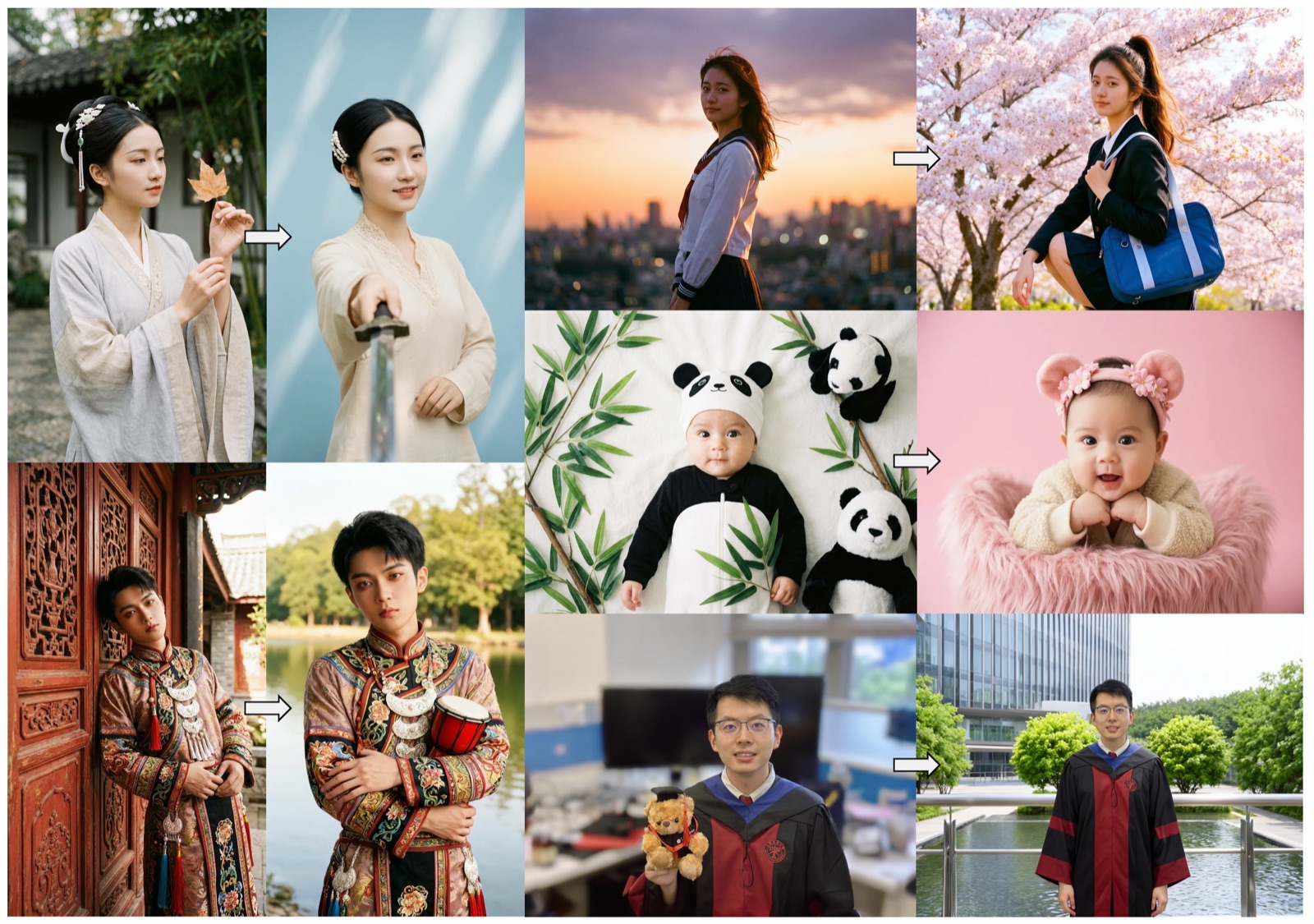
Change clothing or environment while retaining recognizable facial structure and pose.
Move between period, editorial, studio, or illustrative treatments without replacing the person.
Use explicit identity invariants when producing multiple variations of the same subject.
Put the identity constraints in the same instruction as the style change, then inspect facial and body details before accepting the result.
Use a well-lit image where the face, pose, clothing boundaries, and important accessories are visible.
Name the target style, then list identity, expression, pose, proportions, camera angle, and objects that must remain unchanged.
Review facial asymmetry, eye shape, jawline, hairline, hands, and body proportions against the source.
This workflow is useful whenever the person matters more than the decorative treatment around them.
Explore editorial, cinematic, vintage, anime, or illustrative treatments while retaining the subject's identity.
Test clothing direction or styling ideas without changing the model's face, body, pose, or framing.
Apply controlled makeup or character styling while preserving facial geometry and recognizable features.
Write the style request first, then repeat the identity and composition details that must stay fixed.
“Restyle this portrait as a 1970s fashion editorial. Preserve the exact face, expression, hairstyle, pose, body proportions, camera angle, and framing.”
“Replace only the outfit with a tailored black suit. Keep the person's identity, skin, hair, hands, pose, body shape, lighting, and background unchanged.”
“Convert the image to a refined graphic-novel style while preserving facial geometry, recognizable features, expression, pose, and all key accessories.”
A result can be attractive and still depict a different person. Compare stable, distinctive traits rather than judging only overall similarity.
Compare eye spacing, nose shape, jawline, mouth, hairline, asymmetry, age, and expression.
Verify pose, limb length, hand shape, body proportions, and clothing boundaries against the source.
Confirm camera angle, crop, lighting direction, key objects, and background geometry stayed within the prompt constraints.
The 1.1 release explicitly improves portrait consistency, multi-element fusion, stylized text reference, and portrait makeup effects.
Portrait consistency is part of the model's stated 1.1 improvements, not an accidental side effect.
Natural-language constraints let you isolate wardrobe, background, makeup, style, and identity in one workflow.
The open-source repository, model page, technical report, and portrait examples document the capability.
Answers for portrait creators who need the same person to survive a visible style change.
It changes the requested visual style while keeping the subject's recognizable facial and body features consistent with the source.
FireRed Image Edit 1.1 specifically improves portrait consistency. Clear reference images and explicit identity constraints still matter.
List face shape, eyes, nose, mouth, age, expression, hair, pose, body proportions, camera angle, and key accessories that must remain unchanged.
Yes. Request an outfit-only edit and explicitly preserve identity, skin, hair, hands, pose, body shape, lighting, and background.
Yes. Describe the artistic medium and repeat the facial geometry, expression, pose, and accessories that should remain recognizable.
Large style shifts can cause the model to regenerate features. Stronger invariants, a clearer source, and a narrower edit reduce identity drift.
Look at stable traits such as eye spacing, jawline, nose shape, asymmetry, hairline, age, expression, and body proportions.
FireRed supports multi-image editing workflows. Use consistent references and clearly state which image defines identity, clothing, and style.
Portrait makeup is a stated 1.1 capability. Specify the makeup change and preserve facial geometry, skin identity, expression, and lighting.
Check current model and hosted-service terms, obtain the subject's permission, and ensure you have rights to the source image and requested styling.
Yes. Official code and model resources are available from FireRedTeam through GitHub, Hugging Face, and ModelScope.
Use one clear portrait, request one style change, list the identity lock explicitly, and compare the result against the source at full size.
Write the visual direction, lock the subject's identity and pose, then open the prompt in FireRed Image Edit 1.1.
Give the model readable facial and body details.
Repeat every feature and composition element that must stay fixed.
Judge identity, hands, proportions, and scene continuity before export.